Aspire TSX Pods
Introducing the revolutionary Aspire Cyber S Vape Kit Pods! Compatible with the Aspire Cyber S Pod Kit these pods are designed to elevate your vaping experience, the Aspire TSX Pods are packed with impressive features. With inbuilt coils, adjustable airflow, and a personalized draw function, these pods are perfect for both bar salts and nic salts with a 50/50 VG/PG ratio.
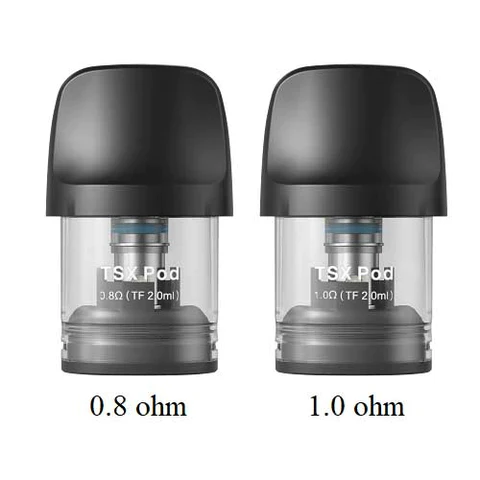
Experience a burst of flavour like never before with the 0.8-ohm Pods. These pods deliver an explosion of taste reminiscent of RDTL (Restricted Direct-to-Lung) devices. Enjoy a lighter draw with abundant vapour production, immersing yourself in a truly satisfying vape session.
On the other hand, the 1.0-ohm pods focus on providing a tighter draw, emulating the sensation of traditional cigarettes. Experience the familiarity of a cigarette while still savouring the incredible flavour profiles offered by these remarkable pods.
How do I adjust the airflow on the Aspire Cyber S Pod Kit/Pods?
To adjust the airflow on your Aspire Cyber S Pod Kit, follow these simple steps. Located at the bottom of your pod, you'll find a rotating insert. Give it a gentle clockwise twist to personalise the airflow according to your preference. Once you're satisfied with the adjustment, insert the pod back into the device, and you're good to go!
How do I fill the Aspire Cyber S Pod Kit/Pods with liquid?
- Translucent Pods: If your pods are translucent in colour, start by popping them out of your Aspire Cyber S Pod Kit. Once removed, you'll notice a rubber band on the side of the pod. Simply pull on the handle of the rubber band to expose the filling port. Insert the nozzle of your liquid into the port and fill the pod to your desired level.
- Black Pods: For black pods, you'll need to remove the cap. To do this, gently pull the mouthpiece of the pod. Once the mouthpiece is removed, you'll see the filling holes on top of the pod. Insert the nozzle of your liquid into the largest hole on top of the pod and fill it until you are satisfied with the amount.
How do I change the draw function/activation function on the Aspire Cyber S Pod Kit/Pods?
- Ensure that your device is turned on.
- Once the device is powered on, quickly press the fire button three times in succession.
- After pressing the fire button three times, observe the indicator lights on the device.
-
If the left light indicator lights up, it means the auto draw function has been activated.
-
If the right indicator blinks, it indicates that the button draw function has been activated.
- If both lights blink simultaneously, it means both button and draw activation modes have been successfully activated.
Original: $8.14
-65%$8.14
$2.85Product Information
Product Information
Shipping & Returns
Shipping & Returns
Description
Introducing the revolutionary Aspire Cyber S Vape Kit Pods! Compatible with the Aspire Cyber S Pod Kit these pods are designed to elevate your vaping experience, the Aspire TSX Pods are packed with impressive features. With inbuilt coils, adjustable airflow, and a personalized draw function, these pods are perfect for both bar salts and nic salts with a 50/50 VG/PG ratio.
Experience a burst of flavour like never before with the 0.8-ohm Pods. These pods deliver an explosion of taste reminiscent of RDTL (Restricted Direct-to-Lung) devices. Enjoy a lighter draw with abundant vapour production, immersing yourself in a truly satisfying vape session.
On the other hand, the 1.0-ohm pods focus on providing a tighter draw, emulating the sensation of traditional cigarettes. Experience the familiarity of a cigarette while still savouring the incredible flavour profiles offered by these remarkable pods.
How do I adjust the airflow on the Aspire Cyber S Pod Kit/Pods?
To adjust the airflow on your Aspire Cyber S Pod Kit, follow these simple steps. Located at the bottom of your pod, you'll find a rotating insert. Give it a gentle clockwise twist to personalise the airflow according to your preference. Once you're satisfied with the adjustment, insert the pod back into the device, and you're good to go!
How do I fill the Aspire Cyber S Pod Kit/Pods with liquid?
- Translucent Pods: If your pods are translucent in colour, start by popping them out of your Aspire Cyber S Pod Kit. Once removed, you'll notice a rubber band on the side of the pod. Simply pull on the handle of the rubber band to expose the filling port. Insert the nozzle of your liquid into the port and fill the pod to your desired level.
- Black Pods: For black pods, you'll need to remove the cap. To do this, gently pull the mouthpiece of the pod. Once the mouthpiece is removed, you'll see the filling holes on top of the pod. Insert the nozzle of your liquid into the largest hole on top of the pod and fill it until you are satisfied with the amount.
How do I change the draw function/activation function on the Aspire Cyber S Pod Kit/Pods?
- Ensure that your device is turned on.
- Once the device is powered on, quickly press the fire button three times in succession.
- After pressing the fire button three times, observe the indicator lights on the device.
-
If the left light indicator lights up, it means the auto draw function has been activated.
-
If the right indicator blinks, it indicates that the button draw function has been activated.
- If both lights blink simultaneously, it means both button and draw activation modes have been successfully activated.